



BC.Game Login Guide: Sign Up, Registration & Password Reset
BC.GAME is restricted in your area.
BC.Game is a crypto online casino where you can play a wide range of casino games, including slots, live dealer games, and more. But before you can enjoy all that, you’ll have to complete the account registration and BC.Game login process. We’ve detailed all the necessary steps in this article so keep reading to prepare yourself properly!
Table of Contents
- ✌ BC.Game Login Process: How to Sign Up
- 📱 BC Game Account Verification
- 📱 How to Log in to BC.Game
- 📱 How to Sign in to the BC Game App for Android and iOS
- 📱 How to Reset Your Password in BC.Game?
- 📱 BC.Game Support and Customer Service
- 🎁 BC.Game Promos
- 🤔 Pros & Cons of BC.Game
- 🌟 Conclusion
- 📖 Frequently Asked Questions
- All of our BC.Game-related articles
✌ BC.Game Login Process: How to Sign Up
Before any BC.Game login can be done, you’ll need to sign up for your account. You can do this using your email address or phone number and a password. This whole process takes only a few minutes, and you’ll be ready to start playing before you know it.
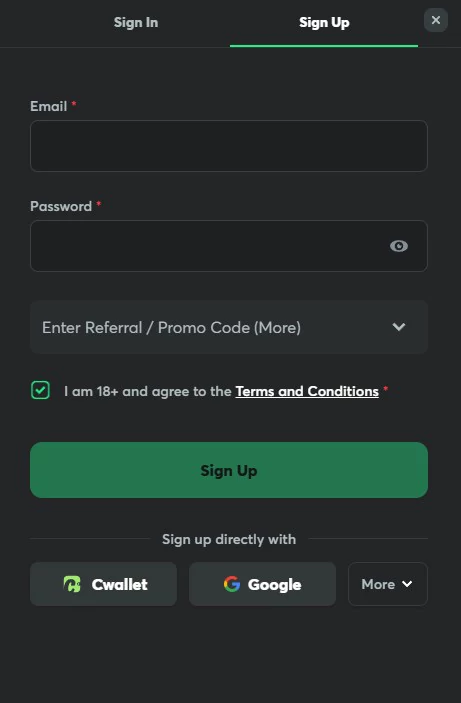
For verification purposes, you might be asked to submit a copy of your government-issued ID documents and proof of address before you can start playing.
You’ll need to be at least 18 years of age to sign up for a BC.Game account. Keep in mind that, although BC.Game is a secure website that protects you with the latest encryption technology, you should take your own precautions as well to protect your account. For example, you should never give anyone else your login details like your password, and you can also set up Two-Factor Authentication as an extra layer of security.
The overall process is as follows:
- Access BC Game via their website or mobile app.
- Look for the ‘Sign Up’ button on the homepage and click it.
- Complete the registration form with your chosen username, email address, and a strong password.
- Hit ‘Sign Up’ to submit your information.
- Check your email for a verification link and click it to activate your account.
📱 BC Game Account Verification
While BC Game allows immediate play post-registration, verifying your account unlocks additional advantages and access to exclusive features. The verification process, known as Know Your Customer (KYC), is a crucial step for certain transactions and platform functionalities.
To verify, simply submit:
- A government-issued ID
- Proof of address
- A recent photograph
This standard procedure not only bolsters your account’s security but also allows you to use specific payment methods that you wouldn’t be able to otherwise. Rest assured, BC Game prioritizes your privacy; all submitted documents and personal information undergo encryption and secure storage.
📱 How to Log in to BC.Game
- Find the Sign in button: Locate the “Sign in” button in the top right corner of the homepage. Click it to reach the login screen.
- Entering credentials: On the login page, input your registered mobile number or email in the first field, followed by your password in the second. BC.Game also offers alternative login options via Google, X, Telegram, and even Steam. If you’ve forgotten your password, use the “forgot password” link below the password field to reset it.
- Confirm the information: After entering your details, click the login button to confirm. With this, the login process is done, and you can start playing, betting, or setting up your account.
To sign in using one of the alternative methods, you’ll just need to enter the relevant details. So, for example, if you’re logging in using Google, you’ll need to enter your Gmail address and password. You can also save your details so that your next BC.Game login is even quicker.
If you’re having any trouble logging in, it might be because you haven’t submitted your verification documents, haven’t verified your account through the verification link, or something else. Regardless, if you’re having trouble, you can reach out to the customer support team for help.
📱 How to Sign in to the BC Game App for Android and iOS
This is fairly straightforward and virtually the same as on PC:
- Launch the BC.Game app on your device.
- Locate the “Sign in” button in the top-right corner of the main screen.
- Input your credentials (phone #, email, password) or use an alternative option (Google, Telegram, X, Steam…):
- Tap “Sign In” to complete the process and start your gaming journey.
These universal steps ensure seamless access to your BC.Game account across all devices.
📱 How to Reset Your Password in BC.Game?
Lost access to your BC.Game account? Don’t worry, reclaiming your password is simple and secure. Follow these steps to get back to your favorite casino games in no time:
- Navigate to Reset: On the BC.Game login page, click “Forgot Your Password” to initiate the recovery process.
- Verify Your Identity: Enter the email address or phone number associated with your account.
- Set a New Password: Check your inbox or SMS for a recovery link from BC.Game. Click it to access a secure page where you can create a new password.
Remember to choose a strong, unique password combining letters, numbers, and special characters for optimal account security.
📱 BC.Game Support and Customer Service
Experiencing issues with your BC.Game account? Their dedicated support team is ready to ensure your gaming experience remains smooth and uninterrupted. Whether you’re facing login problems, technical glitches, or have general inquiries, they’ve got you covered round the clock.
Connect with them through:
- Email: For detailed inquiries, drop them a line. Responses are generally slower through email, so you should use this option for non-urgent or complex issues.
- Live Chat: For immediate assistance, use their website’s live chat feature. Their representatives will swiftly address your concerns.
BC.Game has multilingual support, catering to a global audience with services available in Arabic, English, German, Japanese, and numerous other languages.
🎁 BC.Game Promos
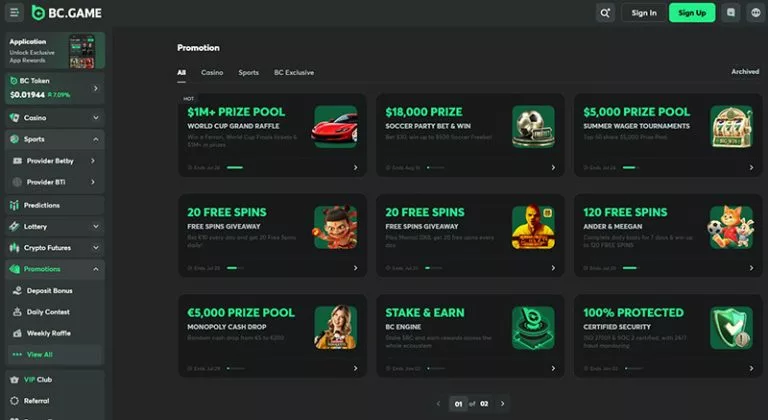
Like all good online casinos, BC.Game has lots of exciting promos for you to look forward to! One of these is the BC.Game Refer a Friend promo, where you can generate a special referral link on the website, and if your friend signs up and plays, you’ll get a big reward in the form of a bonus, plus you’ll get some commission.
Another way to get free bonuses at BC.Game is by using shitcodes. You can find the BC.Game shitcode today and every day by checking our page, or by signing up to BC.Game Telegram or Twitter.
🤔 Pros & Cons of BC.Game
BC.Game sports mobile betting
BC.Game crypto casino
As is the case with all online casinos, BC.Game has a few pros and cons that you should be aware of before you sign up and log in for the first time.
Pro and Con
- You can use crypto for anonymity
- Small selection of traditional deposit methods (bank cards, e-wallets)
- Sign up with Google, Telegram, X, or Steam
- Apps not available in the App Store or Play Store
- Sports betting and casino games available
- Not many promos for live casino players
- Regular offers and promotions available
🌟 Conclusion
Logging in to your BC.Game account is super simple as all the required details are properly outlined and the process itself takes just a few seconds. When you’re signing up and logging in, make sure that you’ve claimed any available promos you see fit, as some may be time-sensitive!
📖 Frequently Asked Questions
BC.Game is a secure online crypto casino where you can play slot games and table games, as well as bet on a whole host of sports like horse racing and soccer.
BC.Game has a better sports offering than most crypto casinos – you can bet on sports like horse racing, tennis, American football and soccer.
You can log in to BC.Game using your email address or phone number and password, or choose a different method like Steam or Telegram.
All of our BC.Game-related articles
| BC.Game review |
| BC.Game bonus codes |
| BC.Game lucky spin bonus |
| BC.Game no deposit bonus |
| BC.Game free spins |
| BC.Game JB coin |
| BC.Game live casino |
| BC.Game login |
| BC.Game redeem code |
| BC.Game referral code |
| BC.Game shift codes |
| BC.Game shitcode |
| BC.Game sweet codes |