


How to enable 2FA on Fortnite to stop hackers


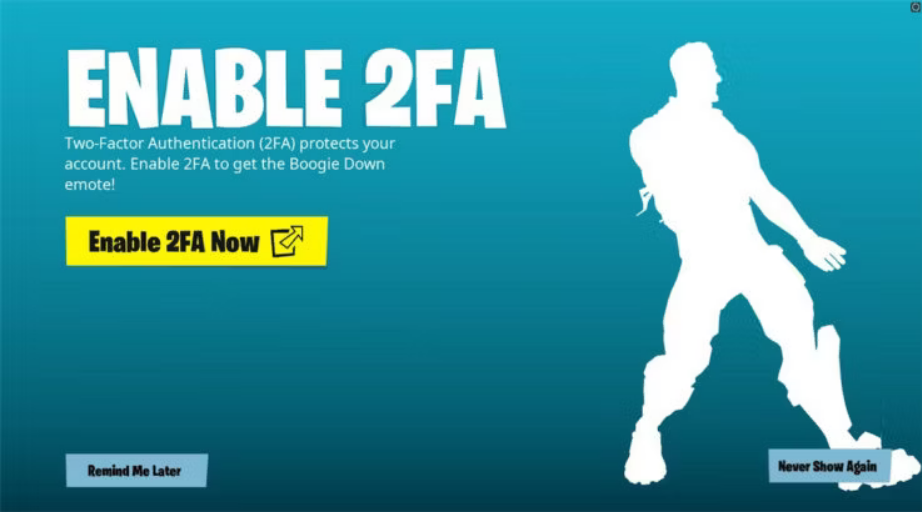
For anyone who wants to keep their skins and items safe, Fortnite 2FA is one of the best and easiest player-led security measures.
Two-factor authentication, sometimes also known as multi-factor authentication of MFA, is one of the easiest ways to maintain account security. Rather than only logging in, players can opt to get an email, code, or text sent to them to confirm their identity. Many companies, from game developers to universities, are now encouraging users to sign up for 2FA and keep their accounts safer. For Fortnite, fans can spend hundreds if not thousands on their account through skins, battle passes, and more. That’s quite an investment, and losing it would be devastating.
No matter the console, here’s how to enable 2FA for Fortnite.
How to enable Fortnite 2FA
Turning on 2FA in Fortnite is simple, though it does require an extra, and sometimes annoying, extra step for each login.
- Login and navigate to Account then Passwords and Security
- Go to Two-Factor Authentication and select which way to receive a code
- Players can pick from SMS, email, or authenticator app
- Choose Set Up and prepare to receive a code from the chosen communication method
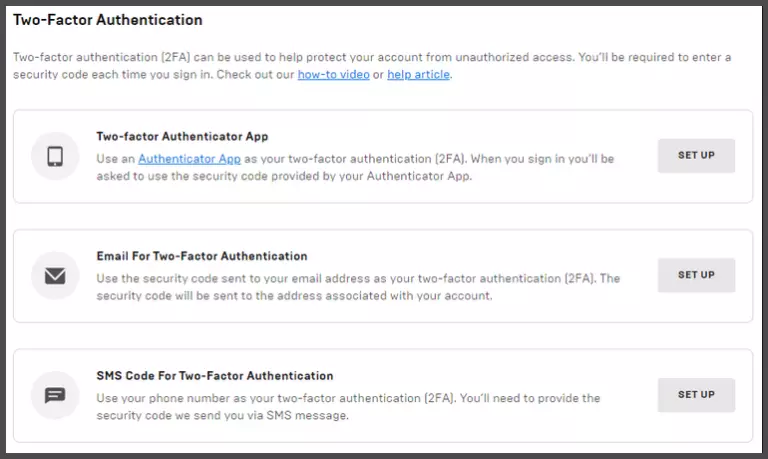
Players will receive a code when they first set up Fortnite 2FA, log in from a different device, come back to the game after 30 days, or clear their cookies. Using email or SMS are the most common methods to receive codes. However, authenticator apps like Google Authenticator or Authy can allow for login confirmation with the tap of a button.
To get some of the best features of Fortnite, players must sign up for MFA. For instance, 2FA is required to send gifts or compete in events like the Fortnite World Cup. However, there’s still a reward for players uninterested in those features. Those who enable 2FA also get a free Boogie Down emote if they don’t have it already.
General 2FA best practices
Epic Games recommends some best practices to follow when enabling Fortnite 2FA to ensure security.
Fortnite players should always do the following after enabling 2FA.
- Keep all contact information up to date to get MFA codes quickly
- Avoid sharing codes
- Consider using more than one method of communication, like both email and authenticator apps
Want to make sure that those rare and expensive skins stay safe? Enabling Fortnite 2FA might be the quickest and easiest way to do so, so long as players keep their codes and passwords to themselves.



Related Articles
All Fortnite News Fortnite
 Fortnite
 Apex Legends
 Esports
 Fortnite
 Fortnite
 Fortnite
 Fortnite
 Fortnite
 Fortnite
No comments yet




 World Cup. EA FC 25. (2x4 min)


 3v3 League. EA FC25 (2x3 min)


 Overwatch World Cup 2026


 Brasileirao Serie A. EA FC 25. (2x4 min)


 ESEA Advanced Season 58 North America






Leave a Comment
Join our community or access your account to post a comment.