


Boaster pro settings: How does one of Britain’s best Valorant players play Valorant?


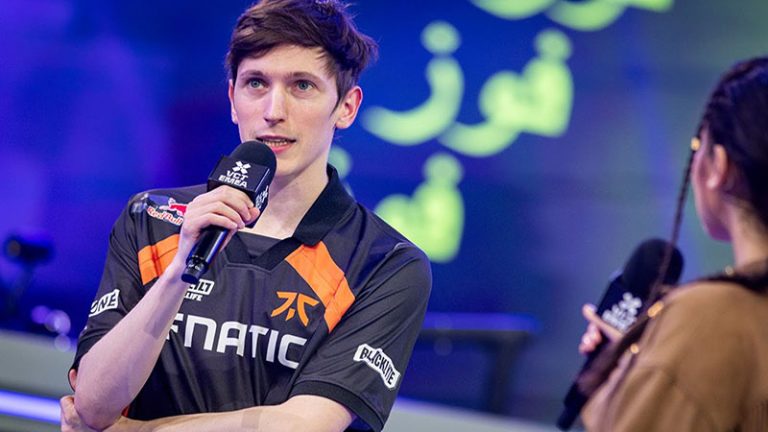
Jake “Boaster” Howlett is a professional British Valorant player. He is one of the most accomplished in-game leaders in Valorant history, leading Fnatic to multiple international titles and tournament appearances. If you want to follow his steps in becoming one of the best captains in the game, copying his in-game settings is a good way to start.
Mouse settings
If you’re curious about what mouse settings your favorite IGL is using, here are your questions answered:
| Mouse Information | Value |
|---|---|
| Mouse Name | ATK Blazing Sky F1 |
| DPI | 800 |
| Sensitivity | 0.24 |
| Scoped Sensitivity | 1 |
| ADS Sensitivity | / |
| eDPI | 192 |
| Hz | 1000 |
| Windows Sensitivity | 6 |
| Raw Input Buffer | On |
Crosshair
If you want to become one of the best Valorant players in the game’s history, copying Boaster’s crosshair might be your first step. Spoiler alert, he’s rocking a dot crosshair:
Primary settings
Boaster uses a green crosshair, which is a common color for visibility. As we hinted earlier, Boaster enables the center dot since he’s using a dot crosshair:
| Primary Crosshair Settings | Value |
|---|---|
| Color | Green |
| Crosshair Color Code | #00ff00 |
| Outlines | On |
| Outline Opacity | 1 |
| Outline Thickness | 1 |
| Center Dot | On |
| Center Dot Opacity | 1 |
| Center Dot Thickness | 2 |
Inner lines
Here are the inner lines that Boaster’s crosshair uses:
| Inner Line Crosshair Settings | Value |
|---|---|
| Show Inner Lines | On |
| Inner Line Opacity | 1 |
| Inner Line Length | 0 |
| Inner Line Thickness | 2 |
| Inner Line Offset | 2 |
| Movement Error | Off |
| Firing Error | Off |
Outer lines
Boaster has enabled outer lines to complement his dot crosshair, making it a little more visible:
| Outer Lines Crosshair Settings | Value |
|---|---|
| Show Outer Lines | On |
| Outer Line Opacity | 0 |
| Outer Line Length | 0 |
| Outer Line Thickness | 0 |
| Outer Line Offset | 0 |
| Movement Error | On |
| Movement Error Multiplier | 1 |
| Firing Error | On |
Boaster crosshair code
If you want to give Boaster’s crosshair a shot, here is a code you can immediately import:
- 0;s;1;P;c;1;o;1;d;1;0l;0;0o;2;0a;1;0f;0;1t;0;1l;0;1o;0;1a;0;S;c;1;o;1
Boaster’s keybinds
Boaster can make calls and still move his in-game character efficiently, thanks to these Valorant pro settings:
| Keybind | Value |
|---|---|
| Walk | L-Shift |
| Crouch | L-Ctrl |
| Jump | Space |
| Use Object | F |
| Equip Primary Weapon | 1 |
| Equip Secondary Weapon | 2 |
| Equip Melee Weapon | 3 |
| Equip Spike | 4 |
| Use/Equip Ability 1 | Q |
| Use/Equip Ability 2 | E |
| Use/Equip Ability 3 | C |
| Use/Equip Ultimate | X |
Minimap settings
To become a good in-game leader, you need to spend half your time alive watching the minimap. These are the minimap settings Valorant’s most accomplished captain uses:
| Minimap Settings | Value |
|---|---|
| Rotate | Rotate |
| Fixed Orientation | Based on Side |
| Keep Player Centered | Off |
| Minimap Size | 1.1 |
| Minimap Zoom | 0.9 |
| Minimap Vision Comes | On |
| Show Map Region Names | Always |
Video settings
Finally, we’ll check out Boaster’s Valorant video settings.
General video settings
Unlike most professional players, Boaster uses a Native resolution and aspect ratio:
| General Video Settings | Value |
|---|---|
| Resolution | 1920×1080 |
| Aspect Ratio | 16:9 |
| Aspect Ratio Method | Fill |
| Display Mode | Fullscreen |
Graphics settings
We can see that Boaster values performance over graphics, as he is pretty much playing on the lowest graphics settings:
| Graphics Settings | Value |
|---|---|
| Multithread Rendering | On |
| Material Quality | Low |
| Texture Quality | Low |
| Detail Quality | Low |
| UI Quality | Low |
| Vignette | Off |
| VSync | Off |
| Anti-Aliasing | MSAA 4x |
| Improve Clarity | On |
| Anisotropic Filtering | 1x |
| Experimental Sharpening | On |
| Bloom | Off |
| Distortion | Off |
| Cast Shadows | Off |
Boaster’s peripherals
Boaster clearly favors one brand for his Valorant gaming setup. It might be a hint that Sony peripherals will help you climb the Valorant ranks:
| Peripheral | Product Name |
|---|---|
| Mouse | ATK Blazing Sky F1 |
| Keyboard | Sony Inzone KBD-H75 |
| Headset | Sony Inzone H9 II |
| Monitor | Sony Inzone M10S |
| Mousepad | Sony Inzone MAT-F |
Read also: Post-Valorant Champs 2025 interview with Fnatic Boaster





Related Articles
All Valorant News Valorant
 Valorant
 Valorant
 Valorant
 Valorant
 Valorant
 Esports
 Esports
 Valorant
 Valorant
No comments yet










Leave a Comment
Join our community or access your account to post a comment.