


How to claim Spectre Divide beta Twitch drops


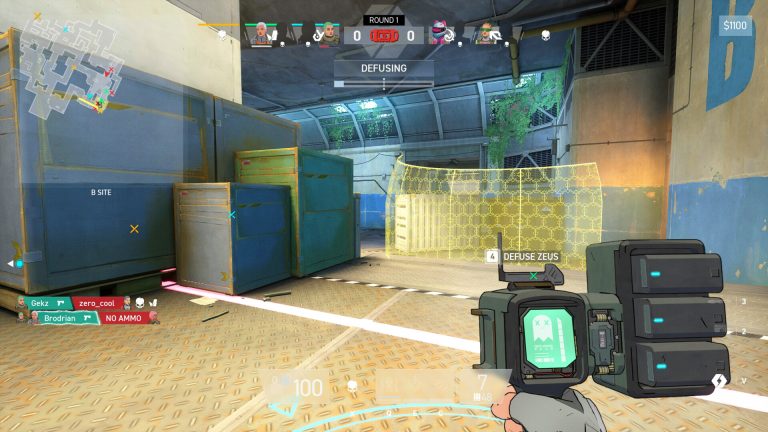
Spectre Divide is finally entering closed beta testing, which means more players can jump into Breakwaters and explore the eight sponsors through Twitch drops.
Spectre Divide is the latest shooter game that gives players two shots at life. It’s unique, cut-throat, and approved by FPS maestro Michael “shroud” Grzesiek, who helped develop the game. The game was recently in closed alpha, but the developer allowed players to Wishlist it on Steam and request access. Those who followed the two steps should check their email for closed beta access. All hope isn’t lost for those who didn’t apply for early access, as Mountaintop is now dropping Steam keys on Twitch.
Besides that, players can also earn the following drops by watching Spectre Divide Twitch streams.
- Troublemakers Banner
- Bad Intentions Spray
- Sinister Smile Charm

How to get into the Spectre Divide closed beta
Players can get into the Spectre Divide closed beta by claiming keys from Twitch drops between August 13 and August 22.
Players are advised to first connect their Steam accounts with Twitch and then go to the Spectre Divide streams page on Twitch. From here, click on streams labeled with drops enabled. Watch any streamers with Twitch drops enabled to get a Spectre Divide Steam key drop.
After watching a broadcast for less than 5 to 8 hours, you may receive a Steam key drop. However, the developer has not mentioned a time frame. The eight-hour benchmark is for the rewards mentioned above, which means the Steam key may also become available within the same time frame.
How to check Spectre Divide Twitch key drops
If viewers have been watching Spectre Divide’s Twitch stream for several hours and are unsure if they have a Steam key, they can check the email associated with their Steam account.
Viewers can also see all drops in their Twitch inventory. In this section, they’ll also be able to track the progress bar for each Spectre Divide reward and how long until you’re eligible for one. Once you have claimed the key, go to Steam and redeem the key to get Spectre Divide. Before downloading, make sure you have 20 GB of free disk space available to store the brand-new shooter game.



Related Articles
All Streaming News
 Apex Legends
 Streaming
 Streaming
 Streaming
 Streaming
 Streaming
 Streaming
 Streaming
 Streaming
No comments yet










Leave a Comment
Join our community or access your account to post a comment.