


How to uninstall League of Legends for good



Players who want to finally get rid of League of Legends have only one legitimate way to uninstall the ultimate time sink.
League of Legends is a relatively smaller sized game, especially when compared to Call of Duty or Grand Theft Auto. It doesn’t take a lot of space but uninstalling the popular MOBA can yield some extra storage on the hard drive or SSD. Players spend a significant amount of time on the addictive MOBA and many choose to spend real money for cosmetics.
Whether it’s the time requirement to master the game or bad financial decisions, uninstalling League of Legends can help with both.
How to delete LoL on Windows
- Here is how you can uninstall League of Legends on Windows PCs.
- Navigate to the Start menu and type Programs, select Add or remove Programs from the search results.
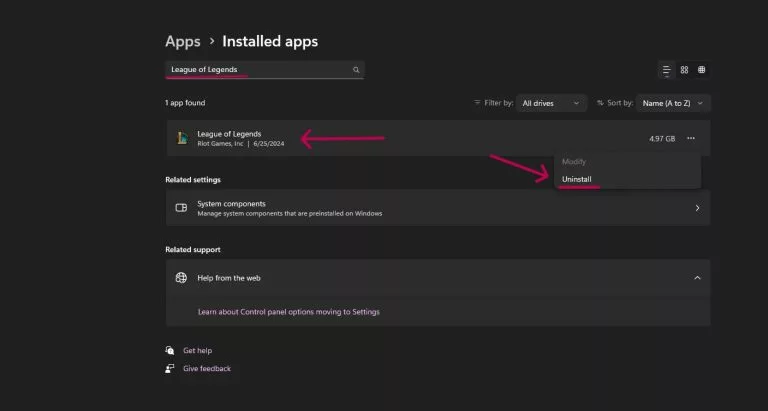
- From there type League of Legends in the search bar at the top.
- Click on the three dots and select Uninstall.
- LoL will uninstall automatically from there.
Alternatively:
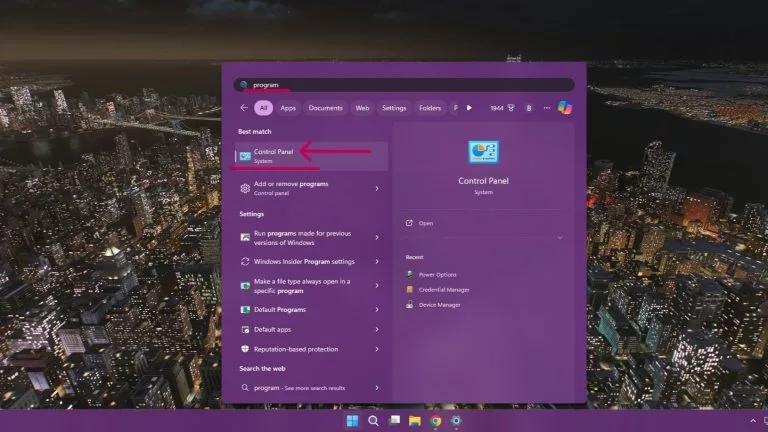
- Go to Control Panel > Programs > League of Legends.
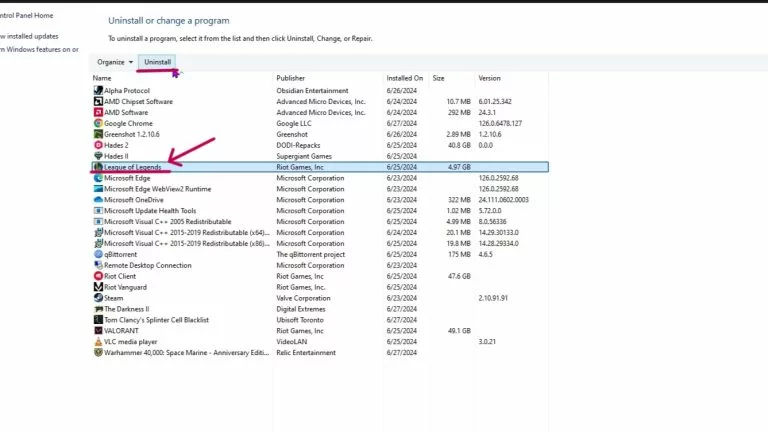
- Select the League of Legends icon and click on Uninstall at the top.
Uninstall League of Legends on Mac
Follow these steps to delete Riot’s MOBA on a Mac computer.
- From the Finder, open the Applications.
- Locate League of Legends.
- Right-click on the icon and select Move to Bin.
- Alternatively, drag and drop the League of Legend icon on the Trash icon.
- Now right click on the Trash icon and select Empty Trash to get rid of League of Legends.
League of Legends won’t uninstall
If League of Legends won’t uninstall, the Riot client could be running in the background. To close the client, follow these steps.
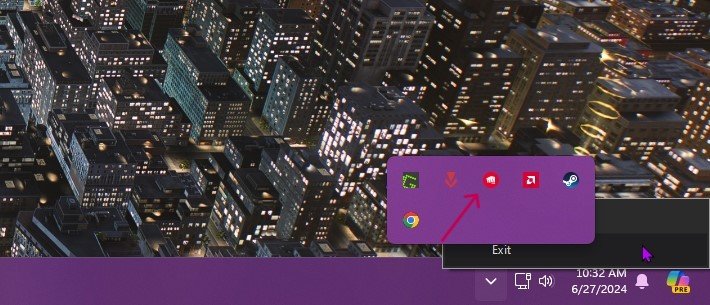
- Click on the Riot Games icon next to the clock in Taskbar on Windows or Menu Bar on Mac.
- Select Quit, Exit, or Close to terminate the client.
- Try uninstalling LoL again.
There are no options for deleting League of Legends from the Riot Games launcher or client. The only way to remove the game is to use operating system tools. Players who are also looking to uninstall Riot’s other popular game Valorant should check out the guide here.




Related Articles
All LoL News LoL
LoL LoL
LoL LoL
LoL LoL
LoL LoL
LoL LoL
LoL LoL
LoL LoL
LoL LoL
LoL LoL
LoLNo comments yet











 World Cup. EA FC 25. (2x4 min)


 Germany. Bundesliga. EA FC 25. (2x4 min)


 Spain. LaLiga. EA FC 25. (2x4 min)


 Copa Libertadores. EA FC 25. (2x4 min)


 Champions League. EA FC 25 (2x4 min)






Leave a Comment
Join our community or access your account to post a comment.