


The best way to use Valorant’s new ability toggle


The latest 9.02 patch of Valorant has brought many bug fixes and new additions to the game, of which the ability toggle is the most interesting.
Riot Games has released the 9.02 patch for Valorant and the patch notes that contain all the changes, fixes, and additions. Various bugs have been fixed, including the Premier overtime voting issue and performance issues. Map bugs have also been fixed so players don’t die when teleporting in Abyss as Omen or get stuck in certain ledges outside the map. A player behavioral intervention update is also included in the patch ensuring players who abuse comms receive extra penalties. The Icebox map has also been added to competitive, unrated, swift play, and deathmatch queues for console players.
However, the star of the patch is the newly introduced toggleable abilities feature which will make gameplay better for all Valorant players.
How to activate toggle ability in Valorant
Valorant’s new abilities toggle feature allows players to toggle the abilities rather than pressing and holding an input to use them.
In the past, players had to hold and press a specific button to use agents’ abilities in Valorant. This new feature introduced in the 9.02 patch allows players to press the button and let go to toggle the ability on and off. This will allow players to use abilities like Harbor’s High Tide, Phoenix’s Fire Wall, Skye’s Guiding Light, Neon’s High Gear, and Sova’s Hunter Fury by toggling. To use it, simply enable the toggle feature in the agent profile settings.
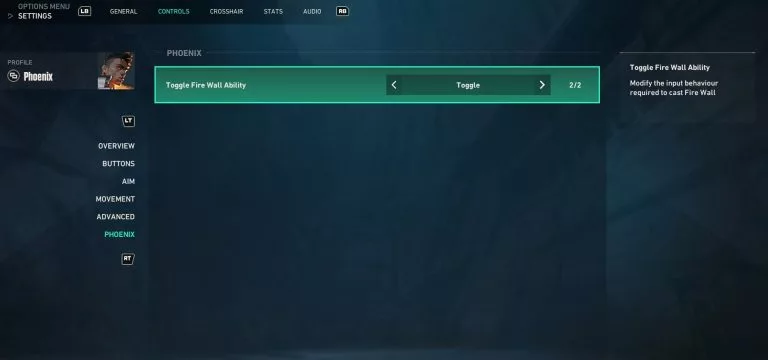
This new toggleable abilities feature will make things significantly easier for players on Valorant console. Some controllers have sticky keys so pressing and holding keys is tricky, but just pressing the key to toggle the ability can be convenient. Furthermore, some players prefer to customize their controls extensively. This toggle feature can come in handy for players who want topersonalize their button layout.





Related Articles
All Valorant News Valorant
 Valorant
 Valorant
 Valorant
 Valorant
 Valorant
 Valorant
 Valorant
 Valorant
No comments yet




 Intel Extreme Masters Beijing 2026: Global Qualifier


 THE POKAL 2026


 CCT South America 2026 Series 5


 Ranked Episode 4: Closed Qualifier


 CN League 2026 - Stage 2






Leave a Comment
Join our community or access your account to post a comment.