


Donk’s CS2 Pro Settings: Mouse, Crosshair, Viewmodel, Video, Radar & Other Gear


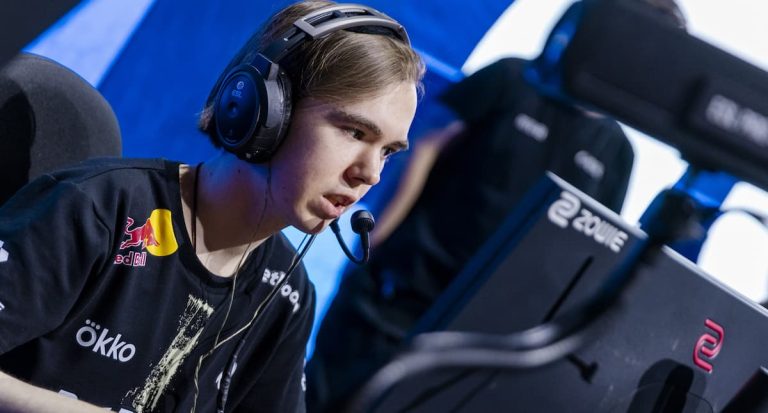
If you’re looking to change your CS2 settings, you should check Danil “donk” Kryshkovets’. The 18-year-old is one of the best CS2 players in the world and helped Spirit win all the most important tournaments in the scene. While simply copying donk’s CS2 pro settings won’t turn you into him, you can see how a pro player optimizes his game.
Mouse settings
Although donk plays high-aggressively roles, his mouse sensitivity isn’t as high as you’d imagine. It’s actually quite balanced and nothing out of the ordinary. This shows that his aim positioning is quite sharp.
| Mouse | Logitech G PRO X SUPERLIGHT Magenta |
| DPI | 800 |
| eDPI | 1000 |
| Sensitivity | 1.25 |
| Zoom Sensitivity | 1 |
| Hz | 1000 |
| Windows Sensitivity | 4 |
Crosshair settings
Donk’s CS2 crosshair settings result in a tiny crosshair. If you wear glasses, for example, it might not be the best crosshair for you, as it’s almost as tiny as a dot, as shown in the screenshot below.
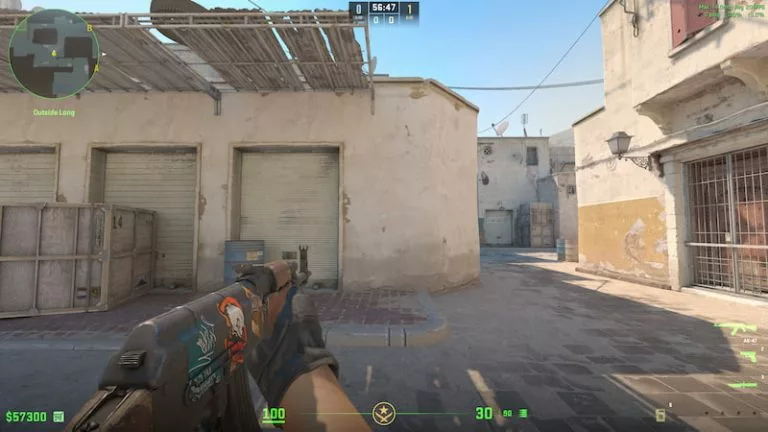
This is how donk’s crosshair looks in-game. Credit: Leonardo Biazzi | © Valve
To copy his Crosshair, copy the code below and go to CS2 Settings > Crosshair. There, you’ll see an option to import a Crosshair.
| Crosshair code | CSGO-AkTYm-syAcf-UKom7-tGKdM-mOJvM |
| Style | Classic Static |
| Thickness | 1 |
| Gap | -4 |
| Length | 1 |
| Dot | No |
| Outline | No |
| Sniper Width | 0 |
| Follow Recoil | No |
| Color | Custom |
| Red | 0 |
| Green | 255 |
| Blue | 135 |
| Alpha | Yes |
| Alpha Value | 255 |
| T Style | No |
| Deployed Weapon Gap | No |
Viewmodel settings
These specific viewmodel settings allow donk to clearly see everything that’s going on in his screen.
| FOV | 68 |
| Offset X | 2.5 |
| Offset Y | 0 |
| Offset Z | -1.5 |
| Presetpos | 2 |
| Full code | viewmodel_fov 68; viewmodel_offset_x 2.5; viewmodel_offset_y 0; viewmodel_offset_z -1.5; viewmodel_presetpos 2; |
Video settings
Donk has stated in interviews that he played with a native 16:9 resolution in the past, and he couldn’t play as well, so he chose to stick with the classic 4:3 Aspect Ratio. Below are donk’s video settings:
| PC specs | Intel Core i9-13900K and NVIDIA GeForce RTX 4080 Super |
| Monitor | ZOWIE XL2586X+ |
| Resolution | 1280×1960 |
| Aspect Ratio | 4:3 |
| Scaling Mode | Stretched |
| Brightness | 93% |
| Display Mode | Fullscreen |
| Boost Player Contrast | Enable |
| V-Sync | Disabled |
| NVIDIA Reflex Low Latency | Disabled |
| NVIDIA G-Sync | Disabled |
| HUD Scale | 1 |
| HUD Color | Pink |
| fps_max | 500 |
| Multisampling Anti-Aliasing Mode | 8x MSAA |
| Global Shadow Quality | High |
| Dynamic Shadows | All |
| Model/Texture Detail | Low |
| Texture Filtering Mode | Trilinear |
| Shader Detail | Low |
| Particle Detail | Low |
| Ambient Occlusion | Disabled |
| High Dynamic Range | Quality |
| FidelityFX Super Resolution | Disabled |
Radar settings
| Radar Centers The Player | Yes |
| Radar is Rotating | Yes |
| Toggle Shape With Scoreboard | Yes |
| Radar Hud Size | 1 |
Other gear
| Keyboard | Logitech G Pro X Keyboard (GX Blue Clicky) |
| Mousepad | SteelSeries QcK+ |
| Headset | HyperX Cloud II |
| In-ears | Shure SE215 Clear |
Featured image: Credit: Viola Schuldner © ESL





Related Articles
All CS2 News
 CS2 CS2
 CS2
CS2 CS2 CS2
 CS2 CS2
 CS2
CS2 CS2
CS2No comments yet










Leave a Comment
Join our community or access your account to post a comment.