


The best radar opacity settings to improve in CS2


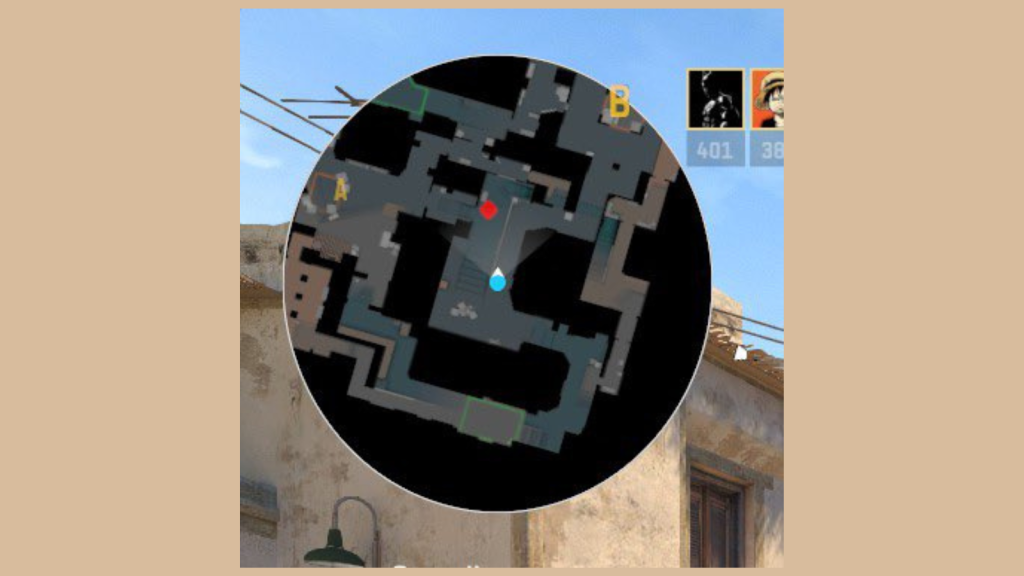
In the new update, Valve has acknowledged all major player complaints, including the radar opacity in CS2, which some players thought was too faded.
Radar is a big part of any multiplayer game, especially shooter games. In FPS games like Valorant, Black Ops 6, and CS2, radar helps track down enemies, navigate the map, and strategize. To support quick readability, major titles prioritize clean, uncluttered radar designs. However, CS2 launched with a redesigned radar that many players found tricky to interpret.
This issue was brought to light by CS2 players in September, gaining widespread community attention. Some players felt the radar in CS was superior, while others argued for a translucent, Valorant-style radar. However, Valve has now introduced a solution that satisfies both sides.
The best radar opacity settings in CS2
Valve has added slider settings for radar opacity, which lets players design the best minimap for themselves. Instead of using console commands, players can now tweak readability, zoom, size, and more.
To change radar settings in CS2, go to game settings and click Radar in the menu. Here, players can tweak the sliders to their liking, but these are the settings we recommend to get the cleanest radar.
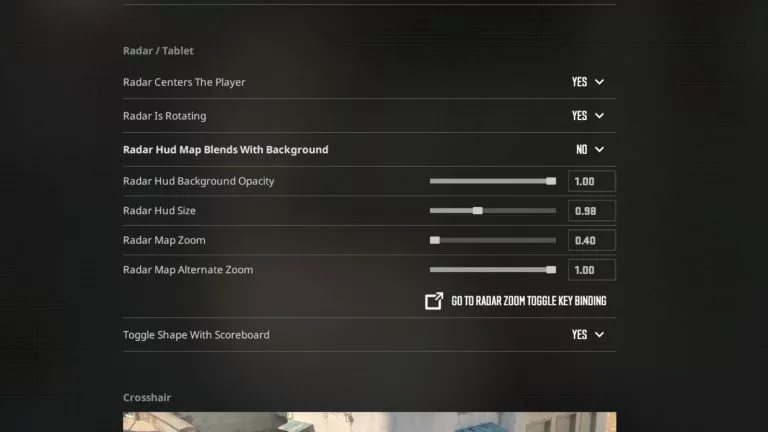
- Radar centers the players: Yes
- Radar is rotating: Yes
- Radar hud map blends with the background: No
- Radar hud size: 0.99
- Radar map zoom: 0.40
- Radar hud opacity: 1.00
Opacity 1.00 is to get CSGO-style radar, which removes all clutter from the surroundings with a dark tint. For a more Valorant vibe radar, slide the bar to the lowest or type 0.00 in the text box. However, this radar still looks a bit faded compared to Valorant and may be a bit distracting. We recommend the CSGO-style dark radar.
These settings may help players better navigate the newly added map Train without mistaking an enemy for another pillar or box.



Related Articles
All CS2 News CS2
CS2 CS2
CS2 CS2
CS2 CS2
CS2 CS2
CS2
 CS2
CS2 CS2
CS2 CS2
CS2 CS2
CS2No comments yet










 Italy. Seria A. EA FC 25. (2x4 min)


 World Cup. EA FC 25. (2x4 min)


 ESEA Advanced Season 59 Europe


 Copa Libertadores. EA FC 25. (2x4 min)


 Champions League. EA FC 25 (2x4 min)






Leave a Comment
Join our community or access your account to post a comment.